Tool Overload Is the New Procrastination
Tool Overload Is the New Procrastination
A simple 3-level AI stack for analytics, with real prices and a sane upgrade path
If you work in analytics right now, you are probably drowning in tool recommendations.
Every week there is a new "agent platform," a new IDE, a new wrapper around the same models, and a new person telling you their stack is the only stack that matters. It is exhausting. It is also a trap.
The uncomfortable truth is that most people are not under-tooled. They are under-leveraged. They are switching tools before they have extracted the value from the tool they already have.
This post is my antidote to that. It is a basic stack with three levels. You can stop at any level. You can upgrade when you actually feel the pain. You can also ignore 90 percent of the AI discourse and still get most of the upside.
The point is not to know every tool. The point is to know what your tool can do.
The three levels
Level 1: One chatbot you actually learn Level 2: One IDE that can touch your real work Level 3: Make the IDE behave like a disciplined analyst, not a random suggestion generator
That is it. Everything else is optional.
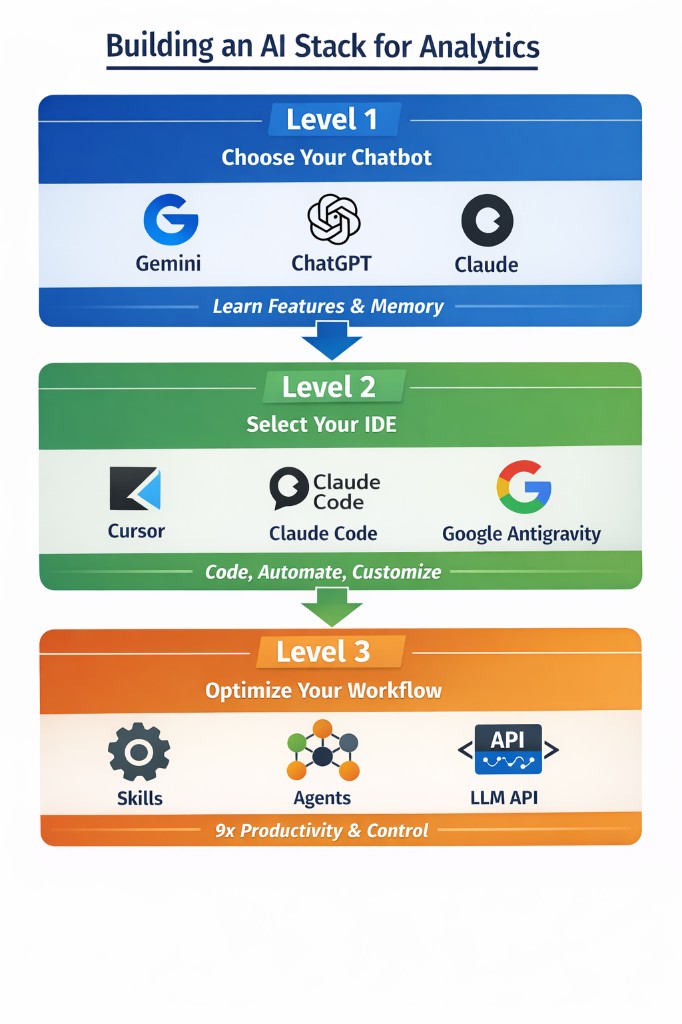
A quick note on Level 2 for anyone not coming from a coding background: an IDE (Integrated Development Environment) is basically a smart text editor that can run code. You do not need to be a developer to use one. Think of it as the difference between drafting something in a chat window versus working in a proper document that the AI can edit alongside you.
Level 1: Pick one major chatbot provider
Most people already use one of the big three. If you are paying for one subscription, you are already in better shape than the majority of teams I see.
My wife's MBA professor told us in 2022 that the twenty-dollar ChatGPT subscription was the best value we would ever get in a product. He was right. The few hundred dollars I have spent since then have been some of the highest ROI money I have spent, period.
Which provider should you pick?
Pick the one you already use. Familiarity matters. History matters. Memory matters. If you are going to build "your" system prompt, and you are going to build projects that you come back to, switching costs are mostly not financial. They are cognitive.
Here is how I think about the options.
Gemini
If you already live in Google Workspace, Gemini is an easy first pick. The integrations feel native because they are.
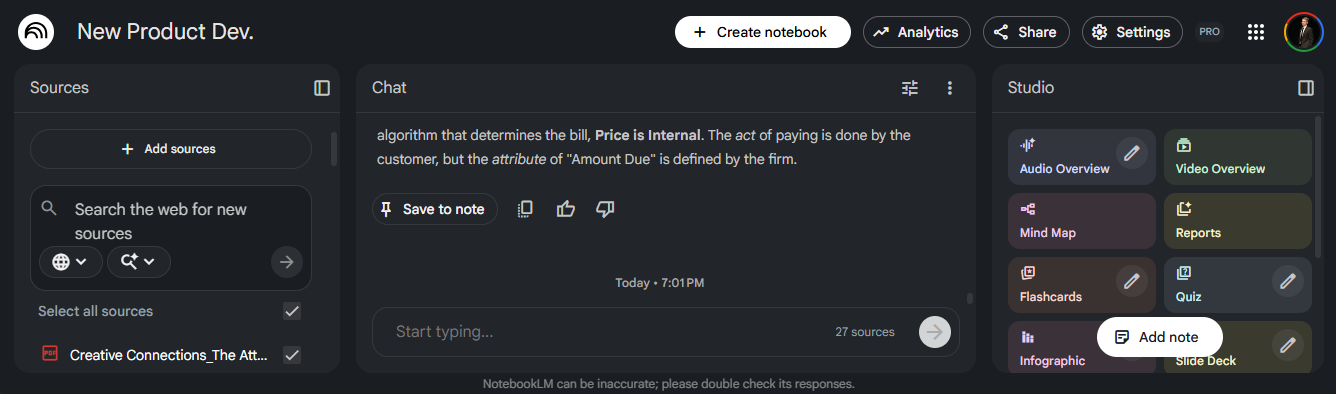
The sleeper feature is NotebookLM. If you do any kind of research, case writeups, or synthesis work, NotebookLM is the closest thing to a "source-grounded analyst" that normal people can use without building their own pipeline. You dump in your documents — PDFs, articles, lecture slides — and the AI answers questions using only what you gave it. No hallucinated facts from the broader internet.
Gemini also has AI Studio, which is underrated. It is the fastest way to prototype small software tools and workflows without bootstrapping a full repo first. Think of it as a sandbox where you can quickly test ideas.
ChatGPT
ChatGPT is the default for a reason. The surface area of features is wide, and the ecosystem is huge. If you are doing analytics work, the combination of data analysis, file handling, and structured workflows is strong.
Also, if you have been using it for months, you already have a personal archive of decisions, drafts, and context. That history becomes part of the product.
Claude
Claude is still the best "thinking partner" for the kind of work I do. The models are consistently strong, especially on long context, writing, and difficult synthesis.
If you have not tried Claude recently, the big things to know are:
- It has a canvas-like workflow through Artifacts — you get an editable document instead of a one-off chat response.
- It has Projects to keep context clean across sessions.
- It has Research-style workflows for deeper synthesis tasks.
- It has a serious bridge into coding workflows through Claude Code.
You do not need to be a power user to benefit. You just need to stop treating it like a novelty and start treating it like a tool you are mastering.
What to actually learn inside your chatbot
This is where most people miss. They buy the subscription, then they use it like a glorified autocomplete box.
Do not do that.
Spend time learning the built-in capabilities, because that is where the leverage is hiding.
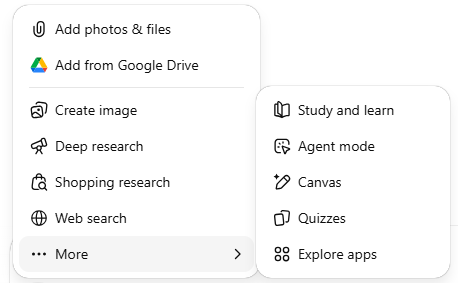
Canvas-style workspaces
This is the "make a file and iterate" mode.
Use it for code, PRDs, memos, whitepapers, or anything where versioning matters. The key is that you stop re-explaining the same thing every message. You get an artifact — a live document — that you can edit, review, and refine in place.
In Claude, this is Artifacts. In ChatGPT and Gemini, it is called Canvas. Same mental model.
Projects
Projects are how you keep the model grounded over time without turning your prompt into a landfill.
A good project is narrow. One domain. One goal. A few core files. A consistent set of rules for how you want the model to behave.
If you do analytics work, Projects are also how you avoid cross-contamination. The "pricing model" project should not leak into the "MBA case memo" project.
Deep Research
This is one of the few features that changes how you should work.
Use it when you would normally open 12 tabs, skim 8 of them, and then pretend you "researched" something. It is not magic. You still need judgment. But it compresses the search-and-synthesis loop into something you can actually trust.
Image creation
This sounds fluffy until you have to communicate.
If you build decks, or you need a quick diagram, or you want a simple visual to make an argument stick, image creation is surprisingly practical. You are not trying to win an art contest. You are trying to get a point across.
NotebookLM (if you are in Google land)
NotebookLM is what I use when I want "answer this, but only from my sources."
That is the whole value. Dump in your lecture PDFs, company docs, or a set of articles. Ask questions. The system stays grounded in what you provided and tells you when it does not know.
Google AI Studio
AI Studio is a rapid prototyping environment. It is where you go when you want to build a small app or a prompt-driven tool without setting up a full development environment first.
It is also a great place to do cheap experimentation before you commit to building something "for real."
Level 2: Select an IDE
Chatbots can take you far. Then you hit a wall.
The wall is always the same: you want the AI to work on your real files, run code on your real inputs, create and edit multiple files, and test changes without you acting like a human clipboard.
This is where the "AI can 10x your work" jargon starts to become real — but only if you are disciplined about what you are doing.
This choice is separate from Level 1. It is mostly about working style.
Cursor
Cursor is still my default for analytics work.
It feels like a modern code editor with AI baked in, and that matters. You can work in a real repo. You can run Python. You can inspect outputs. You can keep everything versioned.
If you are used to VS Code style workflows, the learning curve is low. If you have never used VS Code, the ramp is steeper — but worth it if you regularly work with data files, scripts, or structured documents.
Claude Code
Claude Code is the "serious" coding path from Anthropic. It is built for people who want the model close to the codebase, close to the terminal, and close to the workflow.
If you are comfortable in a command line, it is a great fit. The interface is minimal by design — you are talking to the model, not clicking around a GUI.
Google Antigravity
Antigravity is Google's agent-first development platform, announced in late 2025 alongside Gemini 3.
The simple way to describe it: it is built for multi-agent workflows, not just inline coding help. The AI is assumed to be the primary actor, not just a helper. It integrates tightly with Google's model ecosystem and supports Gemini 3 Pro out of the box, with generous rate limits.
The "agent-first" framing means it is designed to plan, execute, validate, and iterate on complex tasks with less hand-holding than a traditional IDE. For personal projects or early prototyping, it is also effectively free — which makes it a legitimate fallback when you run out of credits elsewhere.
Level 3: Make your IDE work for you
This is where you stop "using AI" and start designing a system.
You are not just picking a tool. You are shaping how the tool behaves and how it fits into your workflow.
Here are the big levers that have mattered most for me.
Skills
A skill is a repeatable workflow you teach your IDE to follow consistently.
Example: a "gut check" skill that forces the assistant to validate assumptions before it gives you an answer. If it does not check row counts, uniqueness, filters, and definitions, it is not allowed to produce conclusions.
Another example: a "knowledge log" skill that updates a living markdown file after each iteration. Every run. Every decision. Every result. This is how you stop losing context across days and weeks.
Skills are how you turn a model into a teammate that behaves consistently instead of a tool that surprises you.
Agents
Agents are how you parallelize.
This is where a lot of the current hype is coming from, and sometimes it is deserved.
If you have repeatable workflows, agents are a multiplier. Monthly reporting. Data pulls. Metric QA. Competitive research. Documentation refreshes. The key is to be honest about what is actually repeatable. If the workflow is not stable, you do not want automation yet. You want clarity. Agents work best when the process is already mostly defined.
LLM APIs
This is the bridge between "chatting with AI" and "building a system that uses AI."
If you want a pipeline that generates a clean markdown report with tables and charts, code can do that on its own. But if you want the report to include executive-ready narrative — not just data — you will usually want an AI model inside the workflow.
Two examples that come up constantly in analytics work:
- Summarizing model diagnostics into plain business language without losing nuance
- Extracting structured data from messy PDFs using AI-powered vision pipelines
Important note: your chatbot subscription and API access are usually billed separately. The twenty-dollar plan does not automatically mean you have cheap, unlimited programmatic access to the same model. Treat the API like infrastructure, and budget it accordingly.
Evaluation and guardrails
If you do analytics, quality control is not optional.
Build basic checks into your workflow:
- Assertions on row counts and uniqueness
- Checks that definitions match your team's agreed-upon standards
- Regression tests on key metrics
- A "no silent failures" rule — the system should tell you when something goes wrong, not quietly produce a wrong answer
This is not glamorous. It is also the difference between AI leverage and AI slop.
Cost and upgrade paths
You do not need all of this at once.
You also do not need to keep paying for Level 1 if Level 2 becomes your daily driver and budget is tight. Switching costs are low. The main cost is losing cross-chat memory and your project setup — but that is reversible if you switch back.
Here are realistic budgets.
Budget path A: one paid tool
- Pick one chatbot plan around twenty dollars per month
- Learn it deeply
- Add an IDE later only when you feel blocked
Budget path B: the analytics sweet spot
- One chatbot plan
- One IDE plan
- Total cost is usually forty to sixty dollars per month, less if you have student discounts
Budget path C: power user
- You will know when you need this
- If you are paying two hundred dollars per month for anything, you should have a very clear reason
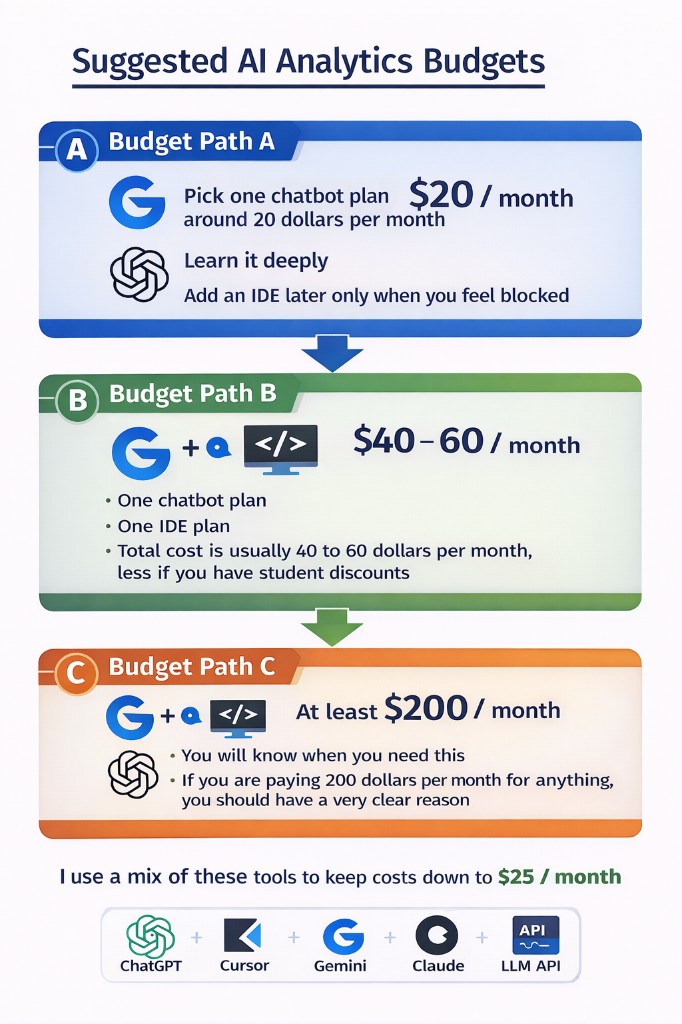
For me, the mix changes month to month.
- I keep ChatGPT because I have so many projects built up across my blog, career, and MBA work.
- I get student pricing on Cursor and Gemini.
- I use Antigravity when I run out of Cursor credits.
- I use AI Studio for quick prototypes and to save cost on early iterations.
- At work, I mix Cursor and Claude Code depending on what I am doing.
The Skeptic's Corner
"There are so many tools launching every week. How do I know when to switch?"
You probably should not switch yet. The question to ask is: have I extracted most of the value from what I already have? If the answer is no, switching is avoidance wearing a productivity costume.
"I am not a developer. Is the IDE step actually for me?"
Probably yes, eventually. Not because you need to write production code, but because the IDE is where you can work on your real files with AI assistance — not just chat about them. Even for a PM or analyst, working in a real file with the AI is fundamentally different from describing a file in a chat window.
"What if I just use whatever my company provides?"
That is a fine starting point. The risk is you stop there. Company-issued tools are often under-configured, under-trained, and not set up for your specific workflow. Learning a tool deeply — even a free one — beats using a premium one at 10 percent capacity.
The takeaway
Spend a few weeks at each level. Do not rush.
You will feel the step change in capability each time you move up a level — but only if you actually learn the tool. Tool hopping feels productive. It is often avoidance.
New tools will keep launching. That does not mean you need to use them all.
Focus on the level you are on. Focus on what that tool can actually do for your work. Focus on switching costs. Then commit long enough to get real leverage.
If you do that, you will end up with a stack that is boring in the best way.
It works.