The Ultimate Student AI Stack: How to Build It for Free Before You Graduate
The Ultimate Student AI Stack: How to Build It for Free Before You Graduate
If you are still using AI through a single chat window, you are only seeing a small slice of what these tools can actually do.
The real leverage comes from combining the right primitives into a system. Large language models are the engine room, but they get much more useful when you connect them to coding tools, dictation, cloud infrastructure, and a place to store what you learn. That is how you build a workflow that helps with research, writing, development, and execution instead of just answering isolated prompts.
That stack can get expensive fast. The good news is that student discounts can subsidize a surprising amount of it. If you are about to finish an MBA or another degree, this is the window to lock in those deals while your school credentials still work.
One note before diving in: offers, pricing, and eligibility rules can change. Treat the deals below as a strong starting point, but verify the current terms before you sign up.
1. The LLM Engine Room
These are the heavy lifters. Your core model layer handles reasoning, drafting, research, analysis, and the messy thinking work that sits upstream of everything else.
Google AI Pro / Gemini Advanced
Why it matters: Access to Google's top-tier model, Gemini 2.5 Pro, along with Gemini Live for conversational brainstorming and 2TB of cloud storage. It is especially useful if you already live in Google Workspace or want a strong research companion.
Student deal: Up to 12 months free.
How to get it: Search for the Google One student offer and complete enrollment verification through SheerID.
Estimated savings: $240 per year.
OpenAI Codex
Why it matters: If you want to move beyond chat and start building scripts, automations, or custom agent workflows, you need access to a capable model through the API. OpenAI credits help fund that experimentation.
Student deal: $100 in API credits.
How to get it: Visit the OpenAI Developers student offer page, sign in, and complete SheerID verification.
Estimated savings: $100 in credits.
Claude Code
Why it matters: Claude remains one of the strongest tools for writing, reasoning, and coding workflows. If you want uninterrupted access to Anthropic's premium experience, it is still a very compelling tool in the stack.
Student deal: At the time of writing, there is no student discount for Claude Pro or Claude Code.
How to get it: Standard paid signup through Anthropic.
Estimated savings: $0.
2. AI-Native Coding Workflows
You do not need to be a full-time software engineer to benefit from coding tools. If you build financial models, write Python scripts, automate personal workflows, or maintain a portfolio site, AI-native IDEs can remove a huge amount of friction.
Cursor AI
Why it matters: Cursor is an AI-first editor that can understand and modify an entire codebase. It is strong at generating code, editing across multiple files, and helping you debug real projects rather than toy snippets.
Student deal: One year of Cursor Pro for free.
How to get it: Apply through the Cursor student page using your university email.
Estimated savings: $240 per year.
GitHub Student Developer Pack
Why it matters: The pack includes GitHub Pro and GitHub Copilot, which gives you an industry-standard AI pair programmer plus access to a broader set of developer perks, services, and credits.
Student deal: Free access to GitHub Pro and GitHub Copilot.
How to get it: Apply through GitHub Education using your school credentials.
Estimated savings: About $100 per year.
JetBrains IDEs
Why it matters: JetBrains tools like PyCharm and WebStorm are among the most robust development environments available. They are especially useful if you want professional-grade tooling with strong language support and native AI features.
Student deal: Free access to the full JetBrains educational license.
How to get it: Apply through the JetBrains educational licenses page with your university email.
Estimated savings: About $289 per year.
3. Voice-to-Text and Frictionless Input
Every workflow has the same bottleneck: getting ideas out of your head and into a system quickly enough to use them.
Voice dictation tools help close that gap. Instead of typing everything manually, you can speak naturally, clean up grammar in real time, and move from thought to draft much faster.
Superwhisper
Why it matters: Superwhisper is a privacy-first AI dictation tool that runs locally. It is particularly relevant right now because it is no longer just a macOS story; there is also a native Windows beta.
Student deal: 40% off.
How to get it: Apply through the Student App Centre using their verification flow.
Estimated savings: About $40 per year, based on the $100 annual plan.
4. Infrastructure and Learning
If you want to go beyond consumer apps and start deploying projects, using cloud services, or experimenting with AI infrastructure, you need credits somewhere.
Google Cloud Learning Credits
Why it matters: These credits help you get hands-on with Google Cloud, whether that means spinning up servers, learning Vertex AI, or hosting your own applications.
Student deal: $200 in Google Cloud Platform credits.
How to get it: Submit a request through the Google Cloud Training Credits application process.
Estimated savings: $200 in credits.
The Layer That Connects Everything: Notion
A stack of disconnected tools is useful. A stack that routes everything into one place is much better.
Notion works well as the central nervous system for this setup. It gives you a place to store meeting notes, project plans, research summaries, documentation, and operating procedures. If your AI tools are generating useful outputs, you need somewhere to organize them so they compound over time.
Why it matters: Notion can become the routing hub for your entire personal knowledge system.
Student deal: Free upgrade to the Education Plus plan.
How to get it: In Notion, go to Settings, navigate to Upgrade Plan, and choose the free education plan with your school email.
Estimated savings: $120 per year.
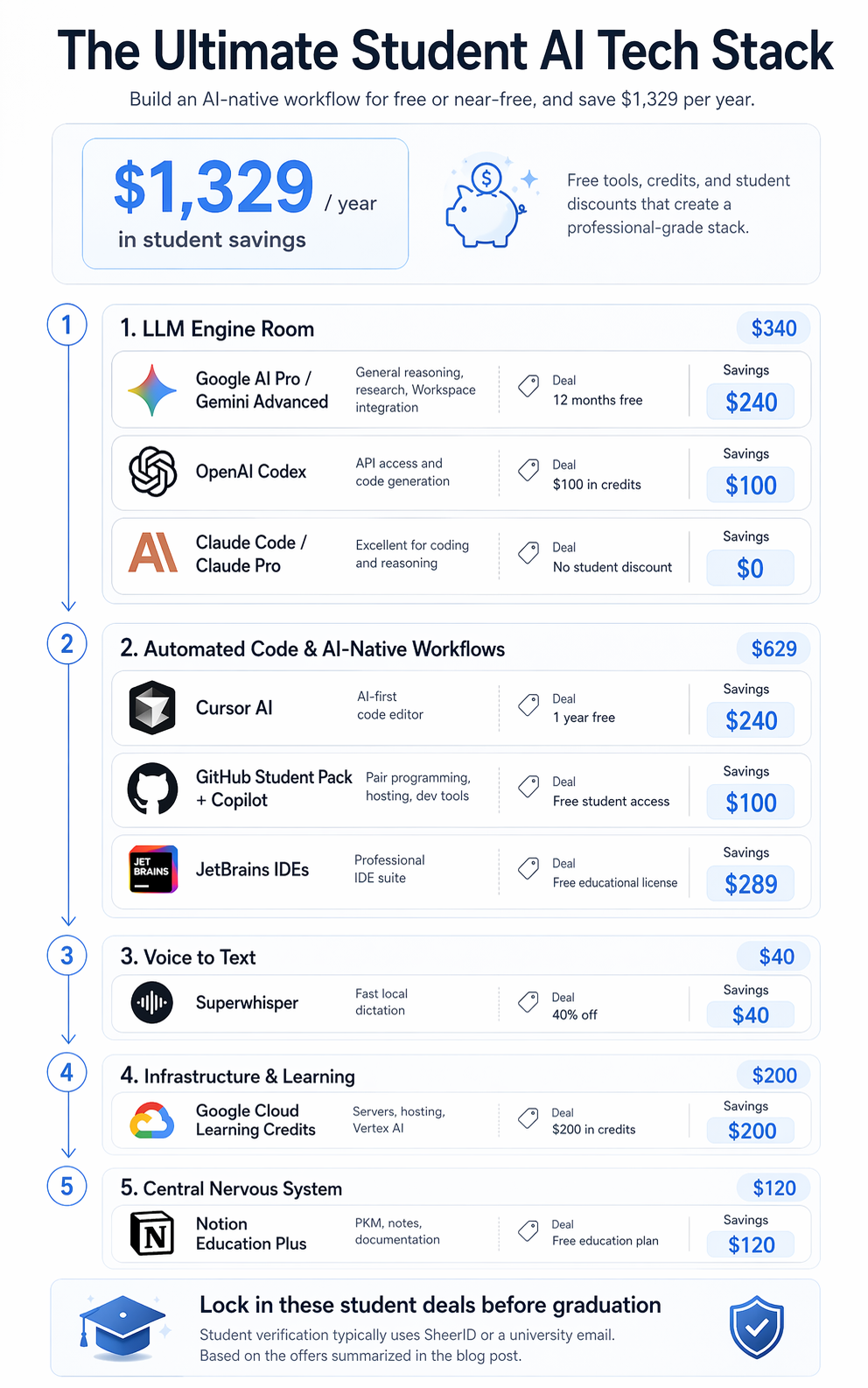
Total Annual Value
Taken together, these offers can meaningfully subsidize your transition from student to professional.
- Google AI Pro / Gemini Advanced: $240
- OpenAI Codex credits: $100
- Claude student discount: $0
- Cursor Pro: $240
- GitHub Copilot / Developer Pack: $100
- JetBrains educational license: $289
- Superwhisper: $40
- Google Cloud credits: $200
- Notion Education Plus: $120
Total estimated savings: $1,329 per year.
Final Takeaway
You do not need an enterprise budget to build a serious AI-native workflow. You just need to know which layers matter and which student programs can offset the cost.
If you are still in school, or only a few weeks away from graduating, this is the best time to lock these tools in. Once your student status expires, so does much of the leverage.
Build the stack while the discounts are still available. Connect the tools. Set up the workflows. Then let the machines handle more of the repetitive work so you can focus on judgment, output, and learning faster than everyone else.