Stop Renting Your Memory From AI
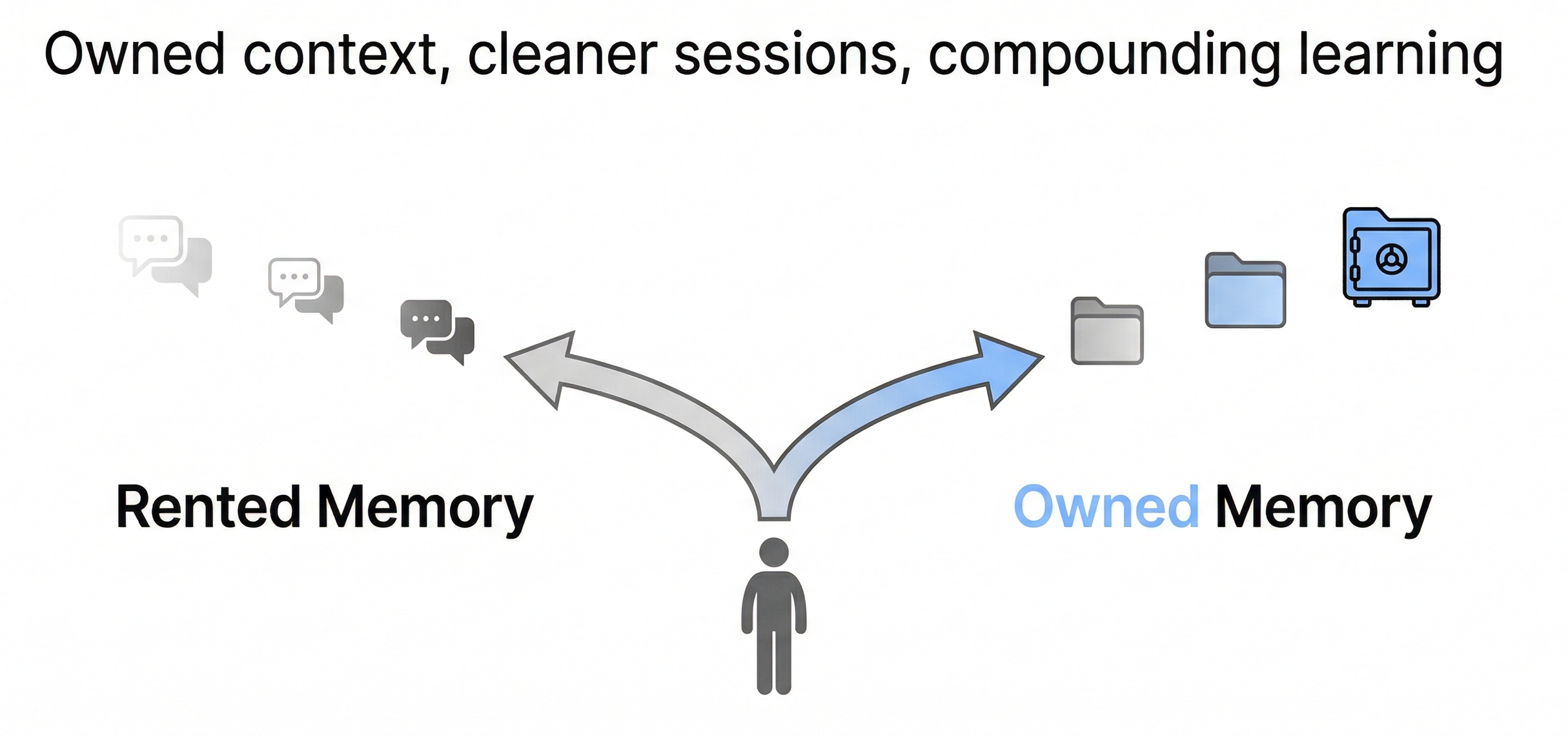
I use AI for way more than work.
Yes, it helps me do my job. But the bigger value is that I have basically turned it into the default co-pilot for my whole life. MBA cases, home networking, NAS decisions, random debugging, buying stuff, fixing stuff, learning how the world works, and going down hobby rabbit holes.
If you do that long enough, something weird happens. You start building a second brain by accident, except the “brain” is split across chat threads, IDE tabs, exports, and whatever tool you happened to be using that day.
That is the moment you realize the real problem is not prompting.
It is memory.
Not “does the tool remember my name” memory. I mean durable, searchable, transferable memory. The kind you can actually own.
The problem nobody warns you about
Most AI advice for PMs is still in the “prompt engineering” era.
Write better prompts. Save templates. Add a few rules. Maybe connect some tools.
That all helps, and I am not anti-prompt. The issue is what happens once you are deep into it.
You get faster, but you also start carrying more and more context into every session:
- A massive instruction file (e.g. a
CLAUDE.mdor system prompt doc) you keep appending to because it worked once. - A mega chat thread where you solved three unrelated problems and now you keep scrolling back to find the one good paragraph.
- Tool integrations that inject long schemas and descriptions into your context window.
Eventually your setup feels like a junk drawer. You know the thing you need is in there somewhere, but good luck finding it quickly.
That is context overflow.
The cruel part is that it feels like you are doing the right thing. You are being “thorough.” You are trying to help the model. Meanwhile the signal-to-noise ratio gets worse.
Bigger context windows do not automatically fix this
A context window is basically the model’s working memory. You can think of it like RAM.
More RAM is great, but if your desktop is covered in open tabs, random PDFs, and a 40-page instruction doc (e.g. a bloated CLAUDE.md), your computer is not magically more productive. It is just more cluttered.
There is also a very real long-context failure mode where information in the middle gets ignored or diluted. The most famous visualization of this is the “Lost in the Middle” curve.
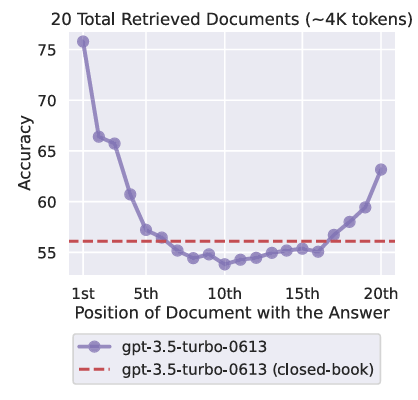
Lost in the Middle (U-shaped performance curve). Source: Liu et al., TACL 2024 (Figure 1, p. 2).
If you have ever watched an assistant ignore something you told it earlier and then confidently do the wrong thing, this is one of the reasons.
You do not need to become an AI researcher to benefit from this. The practical takeaway is simple.
More context is not the goal. Better context is.
Quick glossary, explained like a normal person
I am going to use a few acronyms, because this topic gets messy without them.
Context window is what the model can consider at once. It includes your chat history, instructions, and any retrieved files.
RAG means retrieval-augmented generation. It is a way to pull relevant notes or documents into the prompt so the model is not guessing.
MCP means Model Context Protocol. It is a standard way to connect tools to models. The power move is that tools can ground the model in real systems. The downside is that tool metadata can take up a non-trivial chunk of the prompt.
PARA means Projects, Areas, Resources, Archive. It is a popular way to structure a personal knowledge system.
My first evolution: skills, rules, and tool integrations
My earlier approach was basically two goals:
- Get consistent outputs.
- Make repeatable workflows easy.
So I leaned on rules, reusable prompts, and skills inside Cursor. I also leaned on tool integrations so the model could pull real info instead of hallucinating.
This worked. I got a ton of leverage.
But after a while I noticed something.
The system was getting heavier. Not in a good “more capable” way. In a “more fragile” way.
- My instruction files (e.g.
CLAUDE.mdand project rules) kept growing. - My context windows were paying a tax before I even asked the question.
- I started overfitting my tooling to the current project, then dragging that baggage into the next one.
This is the point where “smart setup” turns into context pollution.
Context pollution, explained the way it actually feels
Context pollution is when your prompt is full of tokens that are technically related to you, but irrelevant to the task.
Common culprits:
- A global
CLAUDE.md(or equivalent system prompt file) that tries to encode your entire personality, style, and life story. - A project
CLAUDE.mdthat becomes the dumping ground for every lesson learned, including the ones that no longer apply. - MCP tool descriptions that consume 10 to 20 percent of the available context, even in sessions where you only use one tool.
At some point you are not briefing the model anymore. You are burying it.
So the question becomes: how do you keep the power, but avoid the bloat?
The pivot: I want to own my memory
I am done treating my chat history like a knowledge base.
Chats are great for thinking. They are terrible for compounding.
So the shift I am making is simple:
I want AI conversations to produce durable artifacts.
Not just answers. Notes. Frameworks. Playbooks. Decisions. Things I can find later.
Once I started thinking that way, the rest of the system snapped into place.
The new stack: Notion, Claude Code, Obsidian
Here is the workflow I am moving toward.
Notion is my operator console. It is where I keep work in motion: meetings, project tracking, decision notes, collaboration.
Claude Code is my execution engine. It is where I build and debug, and where I do the actual work. It also generates a lot of “insight exhaust,” which is exactly what I do not want to lose.
Obsidian is my source of truth. It is my durable, owned knowledge base. Plain Markdown files. Searchable. Linkable. Portable.
This is the diagram version:
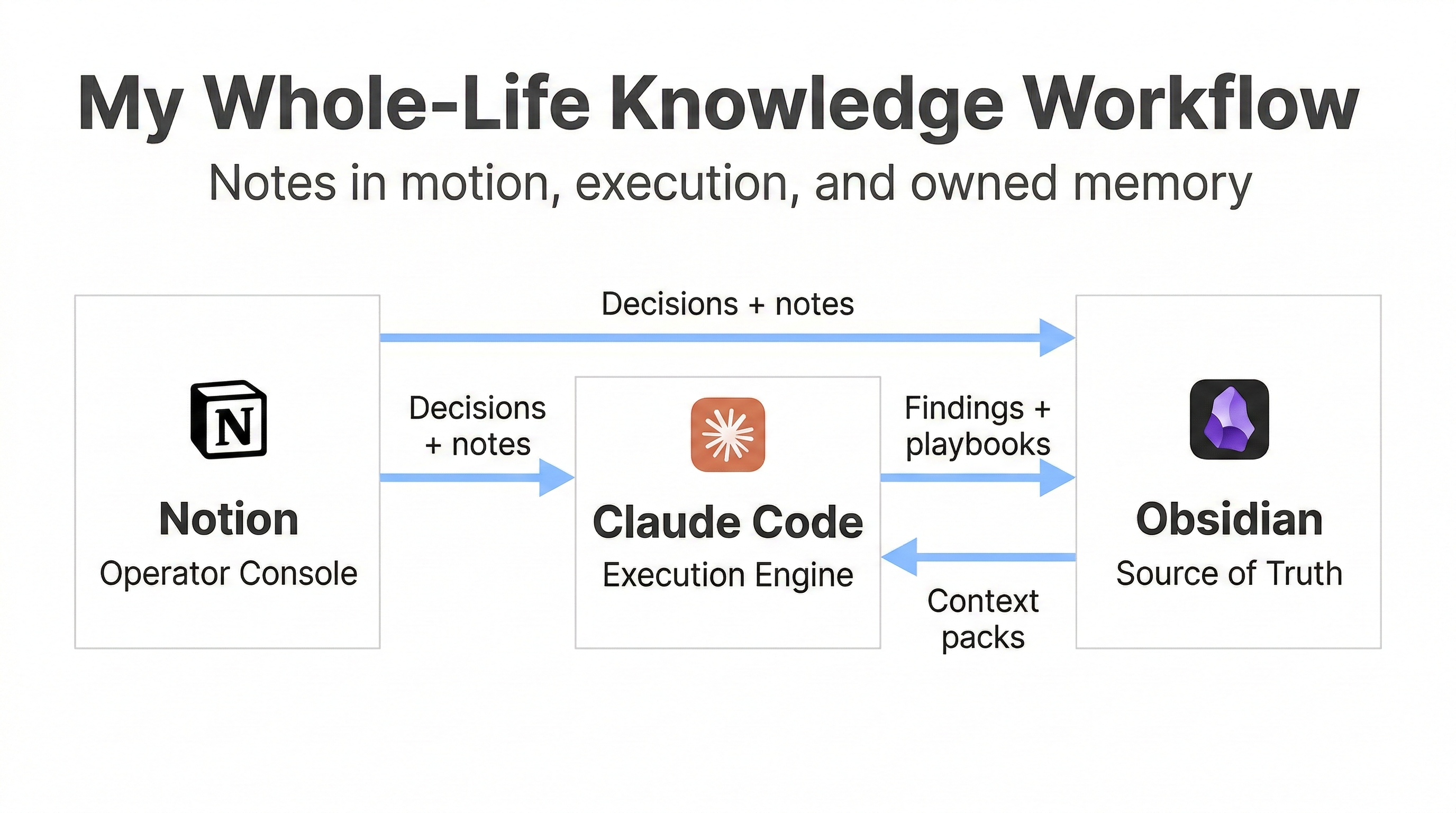
The main idea is that I do not want my knowledge to live inside any single tool’s proprietary memory feature. I want my own files, in a system I can move and query forever.
PARA is helpful here, but I am not chasing purity
I like PARA because it keeps you from overcomplicating your structure.
Projects are what you are actively doing. Areas are what you own. Resources are what you reference. Archive is what you are done with.
This visual is a good anchor:
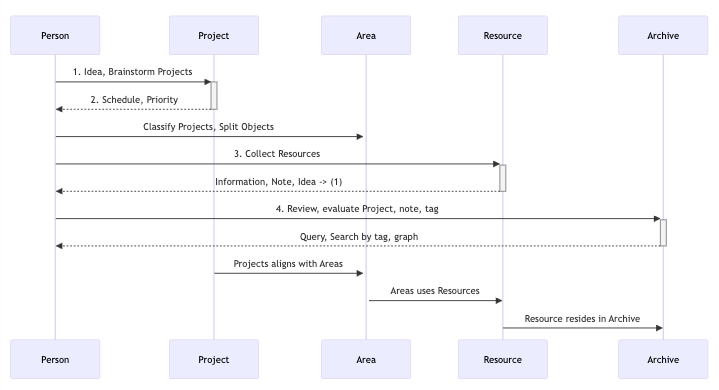
PARA "second brain" flow. Source: Create a second brain with PARA.
My vault is not a perfect PARA implementation, and I do not care. My goal is not aesthetic organization. My goal is retrieval.
The Context Budget framework
Here is the framework I use to avoid going back to the junk drawer.
Think of your context window like a carry-on bag.
You can bring a lot, but you cannot bring everything. If you try, you spend the whole trip digging for your passport.
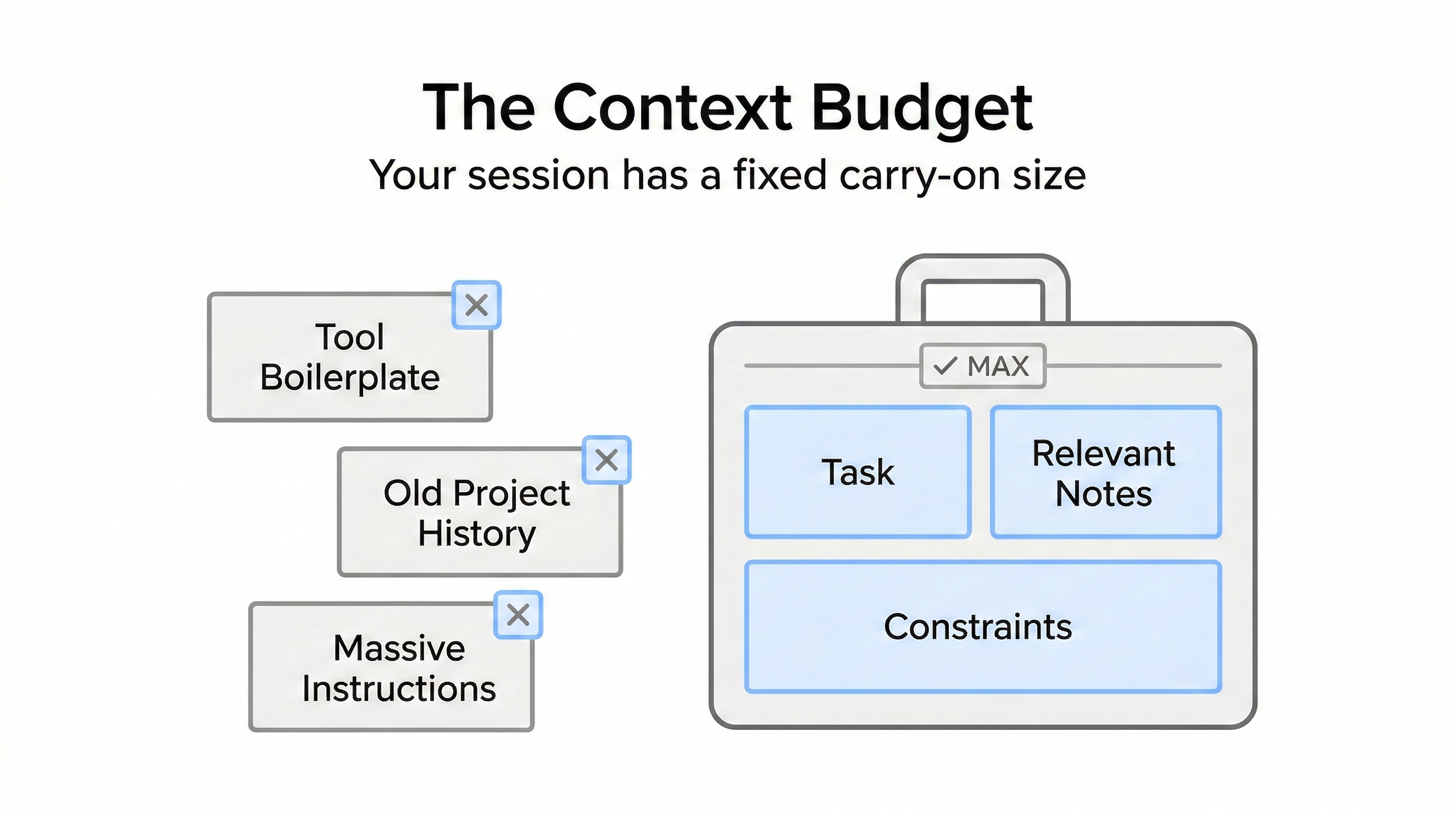
1) Treat tokens like money
If you waste tokens on irrelevant context, you pay for it in cost and quality.
The cost part is obvious. The quality part is the sneaky one.
The more low-signal text you include, the harder it is for the model to focus on what matters.
2) Separate instructions from knowledge
This is the big one.
Instructions should be short and stable. They should be things you can test.
Knowledge should live in your vault. You pull it in when you need it.
If you mix these two, your instruction files will grow forever. That is how you end up with a 2000-line CLAUDE.md that nobody trusts.
3) Use context packs instead of one mega file
Instead of a single global document, I prefer small, composable packs:
writing-style.mdrepo-conventions.mdtesting-playbook.mddecision-log.mdprompt-library.md
The point is modularity. Load what is relevant, leave the rest out.
4) Reset aggressively
When the task changes, the session should change.
New task, new session.
It feels like extra work until you realize how much output quality improves when you stop dragging unrelated history around.
5) Be disciplined about tools
Tool integrations are powerful. They also add overhead.
If you enable every MCP tool “just in case,” you will pay a context tax every time.
Enable what you are likely to use. Disable the rest.
The Memory Stack
This is the conceptual model I wish I had earlier.
There are three layers:
- Layer 1: Working context. The active session. This is where you solve the current problem.
- Layer 2: Session artifacts. Checkpoints, summaries, and notes captured during the session.
- Layer 3: Persistent vault. The durable knowledge you own.
Most people try to store Layer 3 inside Layer 1. That is why their prompts explode.
Here is the visual:
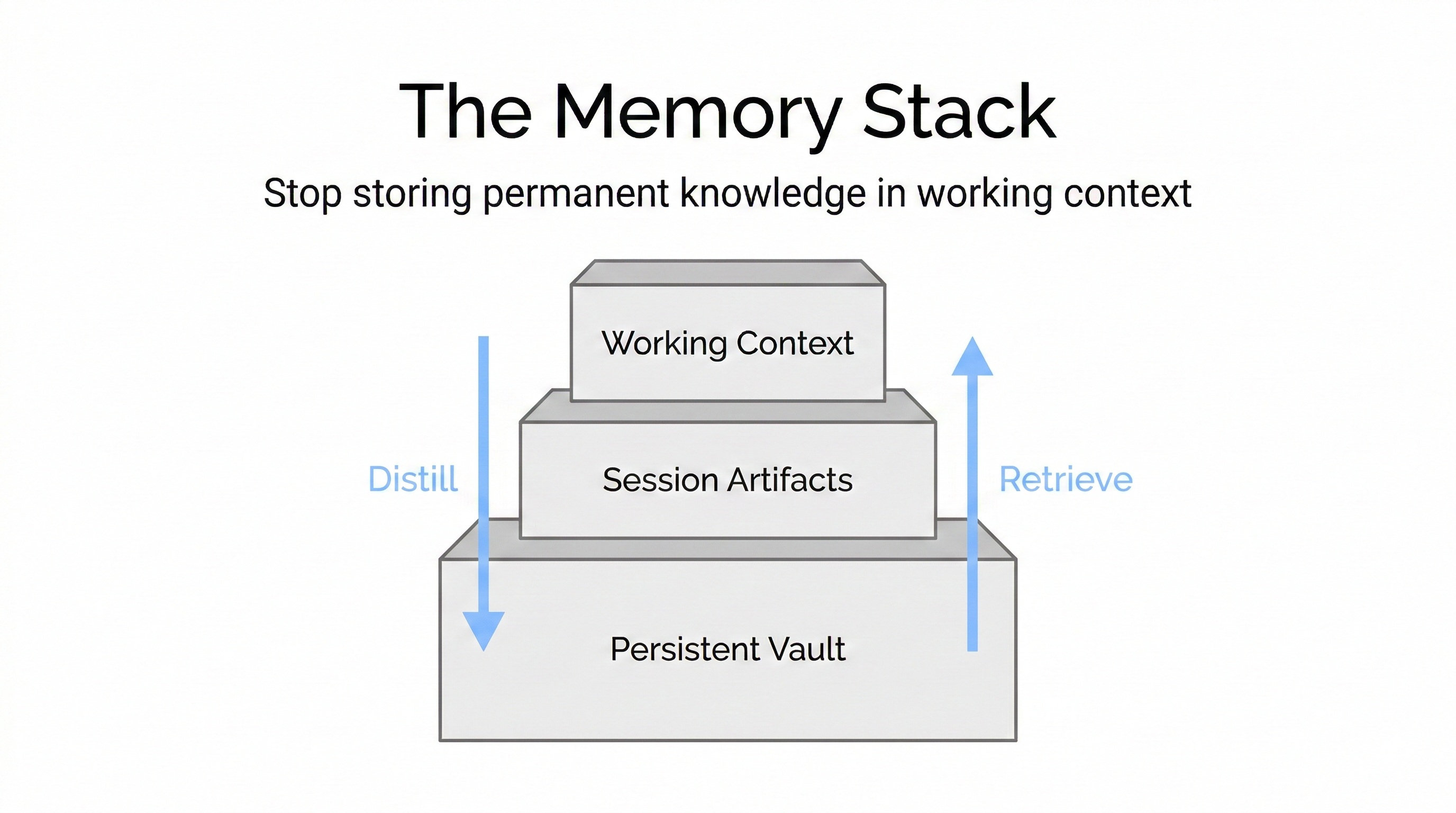
Once you separate those layers, “context management” stops being a vibe and starts being an actual system.
Context decay is not one thing
This is where AI folks will nod, and non-AI folks will still benefit.
Long context introduces multiple failure modes. Models can lose fidelity as inputs get longer and noisier.
This diagram is a good mental model for how different types of context decay show up.
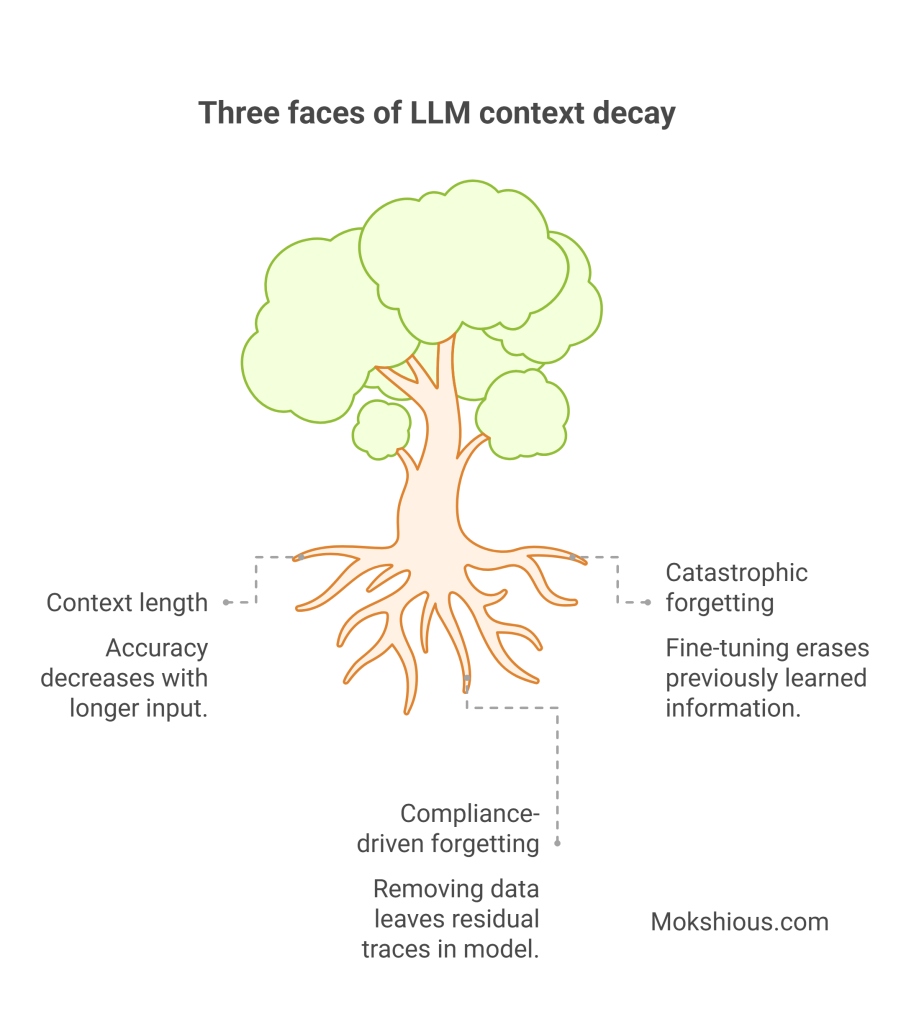
Three faces of LLM context decay. Source: Generative amnesiac occultation: context decay in LLMs.
You do not need to memorize the categories. The important point is that “just add more” is not a strategy. It is a way to accumulate risk.
What this looks like in practice: clean sessions that still feel personalized
Here is the end state I want.
I can start a fresh session for a new task, keep the working context clean, and still have it feel like “me” because I can pull in the right context pack.
Example:
- If I am doing an MBA case, I load the pack with my case template, my preferred analysis structure, and my rubric.
- If I am debugging a home networking issue, I load the pack with my current network setup and prior fixes.
- If I am making a buying decision, I load the pack with my decision criteria and prior purchases.
The system stays personal without being bloated.
That is the whole trick.
The capture pipeline: turning chats into assets
This is the part I am actually building.
Instead of leaving value trapped inside transcripts, I want a pipeline that:
- Ingests exports from ChatGPT and Claude, plus meeting notes from Notion
- Filters out low-signal threads
- Classifies what remains
- Distills it into consistent Obsidian templates
- Lets me review before anything becomes permanent
- Writes everything to an Inbox first
My durable note types look like this:
- Findings: reusable insights
- Frameworks: repeatable methods
- Playbooks: step-by-step guides I will use again
- Decisions: what I chose, why, and what I learned
- Ideas: experiments and projects
- Blog seeds: hooks, outlines, drafts
This is how you turn “I learned a lot last month” into “I can retrieve and reuse that learning in 20 seconds.”
This is not theoretical for me, I am already turning exports into “Findings”
The funny thing is, once I stopped treating chat history like a sacred archive, the workflow got easier.
I already have enough “AI exhaust” to last a lifetime. Cursor chats. ChatGPT threads. Gemini threads. Random one-off debugging. Deep dives that I genuinely learned from. I do not need more raw logs. I need distillation.
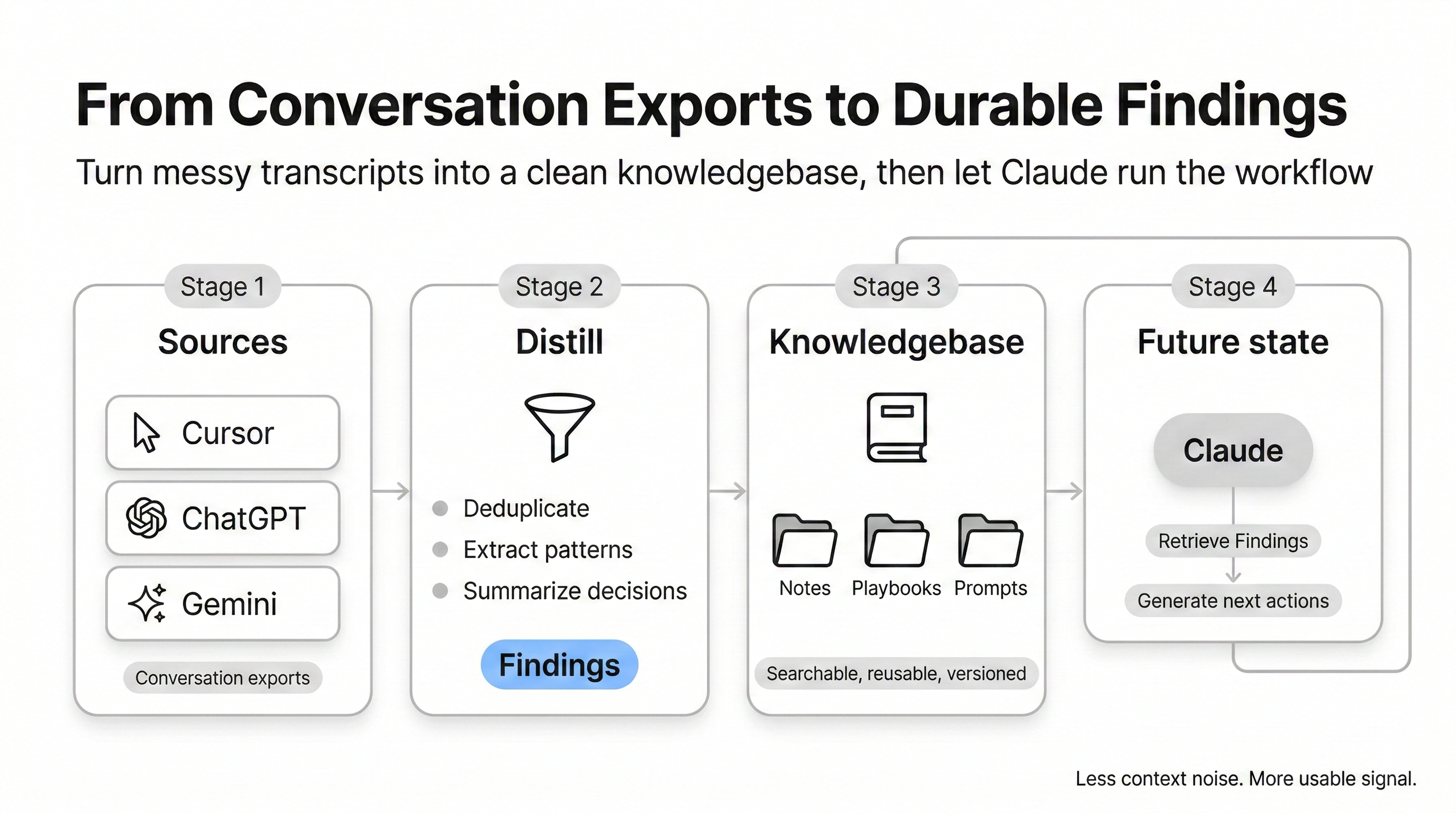
So I started parsing the sources I actually use, then distilling them into one durable unit in my vault: a Finding.
The pipeline idea is simple:
- Pull conversation history from the places I spend time (ChatGPT exports, Cursor IDE conversations, and now Gemini exports too).
- Run a cheap filter so I do not “save” junk, like quick one-off tasks or low-signal debugging.
- Classify what is left into a small set of note types, then summarize into a consistent Obsidian template, with a review step before anything gets written.
Why “Findings” as the centerpiece?
Because “Finding” is the smallest unit that still compounds. It is not a transcript. It is not a full essay. It is just a reusable insight or pattern, written in a way that future me can scan fast.
This also fits my reality. Cursor is where a lot of my technical learning happens, and those conversations are not easily searchable later unless you pull them out. Cursor stores them in its local database, so I can read them directly and process them like any other source.
Gemini is similar. The format is different, but the concept is the same. Exports are just another stream of raw text that can be distilled into the same “Finding” template and dropped into my knowledge base.
Claude is the future state
Right now, I am extracting value from everywhere. The endgame is that Claude becomes the primary execution layer.
Not because Claude is “better” in some abstract way, but because Claude Code sessions are where the most valuable work happens for me. That is where I build, debug, and iterate. The pipeline already expects Claude exports as a first-class source, and it is designed to feed the same review-and-write flow into Obsidian.
The part I care about most is making capture automatic at the right moments. For example, using a lightweight session wrapper that nudges me when a session gets long, so I save the 1 to 3 real insights instead of pretending I will remember them later.
That is the whole strategy.
Stop stuffing permanent knowledge into the working context.
Distill it into Findings, store it once, then pull it back into the session only when it is relevant.
Context pollution vs clean context
If you only remember one visual from this post, make it this one.
A polluted session is mostly boilerplate and history.
A clean session is mostly the task, plus the minimum relevant context.
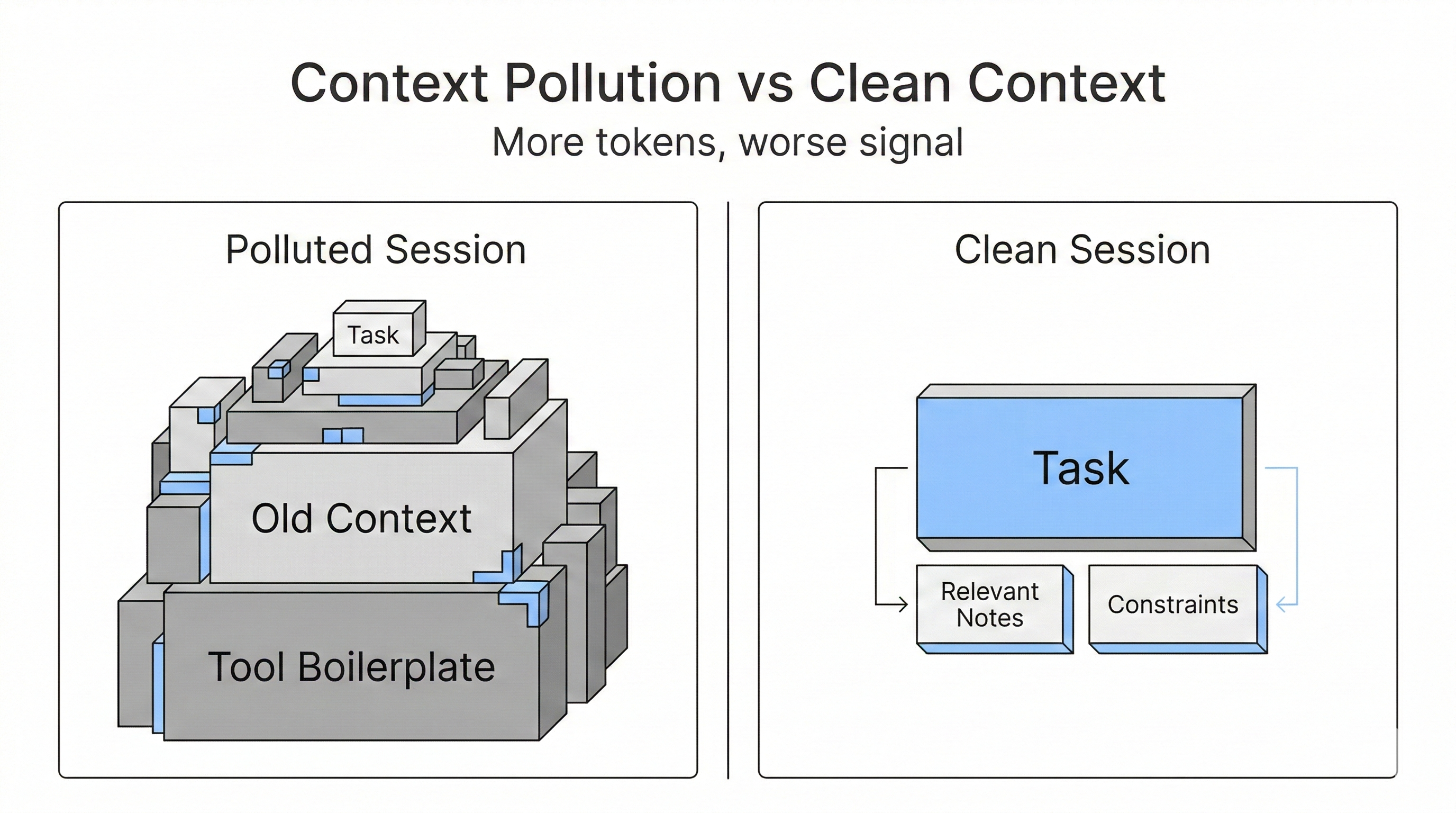
That picture is basically the difference between AI that feels magical and AI that feels unreliable.
Two tweets that capture the vibe
These are not citations, but they were helpful as a sanity check that other builders are converging on the same conclusion.
How I will know this is working
I am treating this like a product, so I want a scorecard.
- Retrieval speed: can I pull the right context in under 60 seconds?
- Reuse: did this note prevent a future re-explanation?
- Coverage: are my best learnings making it into the vault?
- Context efficiency: is my default prompt footprint shrinking over time?
- Portability: could I switch AI tools tomorrow without losing the system?
If those improve, the system is doing its job.
If not, I am just building a fancier junk drawer.
What is next
This post is the why.
Next I want to publish the how:
- The vault structure I am using
- The templates for findings, frameworks, playbooks, and decisions
- The capture pipeline that processes exports into notes
- How I keep tool integrations and instruction files (and
CLAUDE.mdbloat) from eating the entire context window
The real punchline is not “AI makes you faster.”
AI does make you faster, but that is table stakes.
The actual unlock is compounding. Owned memory is how you compound.